
Looking for a reliable patio door keyless entry solution? This guide highlights five top options designed for sliding glass doors, focusing on ease of use, security, and installation. Best for homeowners upgrading a porch or balcony door, renters seeking temporary access, and landlords managing multiple units. Below you’ll find concise comparisons, practical pros and cons, and a buying guide to match your door thickness, power options, and access methods.
| Product | Best For | Key Feature |
|---|---|---|
| eLinkSmart Sliding Glass Patio Door Lock | Tech-savvy homes needing multi-method unlock | AI fingerprint, keypad, RFID, app control |
| Eseesmart Sliding Door Smart Lock | Flexible installation across door types | 5 unlock options; portable power backup |
| Smart Door Lock with Biometric & App | High-capacity user access & remote control | 5-in-1 unlock; no WiFi required for remote unlock via app |
| Kucacci Keypad Smart Door Lock | Front-door style reliability; easy DIY upgrade | Multiple access methods; Alexa-ready via gateway |
| Dhiedas Fingerprint Sliding Door Lock | Slim-fit doors; large number of users | 2885 slim fit; app and biometric access |
eLinkSmart Sliding Glass Patio Door Lock

Unlocking options include fingerprint, password, app control, RFID card, or a backup key. The device generates temporary passwords for guests, cleaners, or renters and logs every entry in the app. It uses AES-256 encryption for data and offers an AI-powered fingerprint system to deter fake prints. Best for tech-forward homes or rental properties needing granular access control.
Best for: Households prioritizing multi-factor access and detailed entry logs. Caution: Requires battery management with optional Type-C charging for emergencies.
Eseesmart Sliding Door Smart Lock

This lock offers five unlock options: fingerprint, code, mobile app, RFID card, and backup key. It supports up to 300 users, with flexible installation for door thicknesses from 13/16″ to 4-3/4″ and a reversible handle for both left and right opening doors. Best for multi-user homes or rentals needing varied access. Caution: Power consumption is a consideration; ensure battery life and backups are planned for remote locations.
Smart Door Lock with Biometric & App
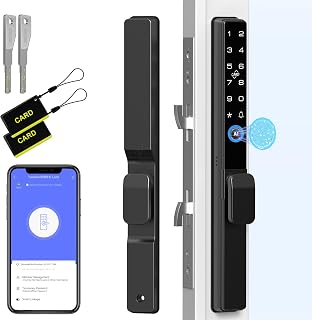
Offers five unlock methods: app, RFID, fingerprint, passcodes, and backup keys. It supports up to 300 users (9 administrators, 291 ordinary users). Remote unlock is possible via app without requiring WiFi, making it suitable for renters or landlords who need to grant access remotely. Best for: Properties requiring robust user management and flexible access. Limitation: Remote unlock without WiFi may rely on app-based signaling—verify compatibility with your setup.
Kucacci Keypad Smart Door Lock

Easy DIY installation allows upgrading front doors with no extra tools in about 10 minutes. It provides fingerprint, PIN code, smartphone app, key fob, and mechanical keys, with Alexa voice and remote unlock via a gateway. Best for: Homeowners wanting a straightforward upgrade with multiple access options. Limitation: Some features require a gateway for full remote control and voice integration.
Dhiedas Fingerprint Sliding Door Lock

Designed for slim doors with a 2885 slim-fit profile, this lock supports fingerprint, RFID, app, and passcodes, plus backup keys. It accommodates up to 300 users (9 admins, 291 regular). Best for: Slim-profile doors and users who need high-capacity access control. Caution: Ensure proper fit with door thickness and frame width before purchasing.
Buying Guide
What should you consider when choosing a patio door keyless entry lock?
- Door compatibility: Measure thickness and frame width to ensure a slim-fit or standard fit. Look for locks labeled for 13/16″ to 4-3/4″ doors and verify clearance from frame edges.
- Unlock methods: Decide how many methods you need. If you host guests or tenants, multiple options (fingerprint, code, app, RFID) offer flexibility and convenience.
- Power and backups: Check battery life (often 6–12 months) and whether USB-C or power-bank backups are supported for emergencies.
- Remote access: Consider whether you require remote unlock without WiFi or require a gateway for voice assistants and enhanced admin controls.
- Security features: Look for AES-256 data encryption, anti-spoofing fingerprint tech, tamper alerts, and auto-lock after failed attempts.
- User management: For multi-user households or rentals, ensure the lock supports the number of users and permissions you need (admins, guests, cleaners).
- Installation ease: DIY installation is common, but some models may need professional help or specific door configurations. Reversible handles improve compatibility with left/right opening doors.
Frequently Asked Questions
What is the easiest patio door keyless lock to install?
Locks marketed for DIY installation with clear screw- and template-based setup typically require no special tools beyond a screwdriver and may fit common door standards. Look for “easy DIY installation” features.
Do these locks work without WiFi?
Many models support offline keyless access via fingerprints, codes, or RFID. Some features like remote unlock may require a gateway or WiFi.
How many users can these locks handle?
Most options support 300 users (with a subset designated as administrators). Check each model for exact limits and how access is granted or revoked.
Is fingerprint security reliable for door locks?
Modern smart locks use advanced sensors and encryption to deter spoofing, but performance can be affected by wear on fingerprints or environmental conditions. Regular software updates help maintain security.
Can I use these on left- and right-opening doors?
Many models feature reversible handles or compatibility with both opening directions. Verify hand orientation and installation notes before purchase.
What maintenance is required?
Typically low maintenance, with battery monitoring and occasional firmware/app updates. Keep backup keys or power options ready for emergencies.